28 / Documents
Redaction
Mark regions to black out before a document leaves the building, with a reveal that says plainly it is only a preview.
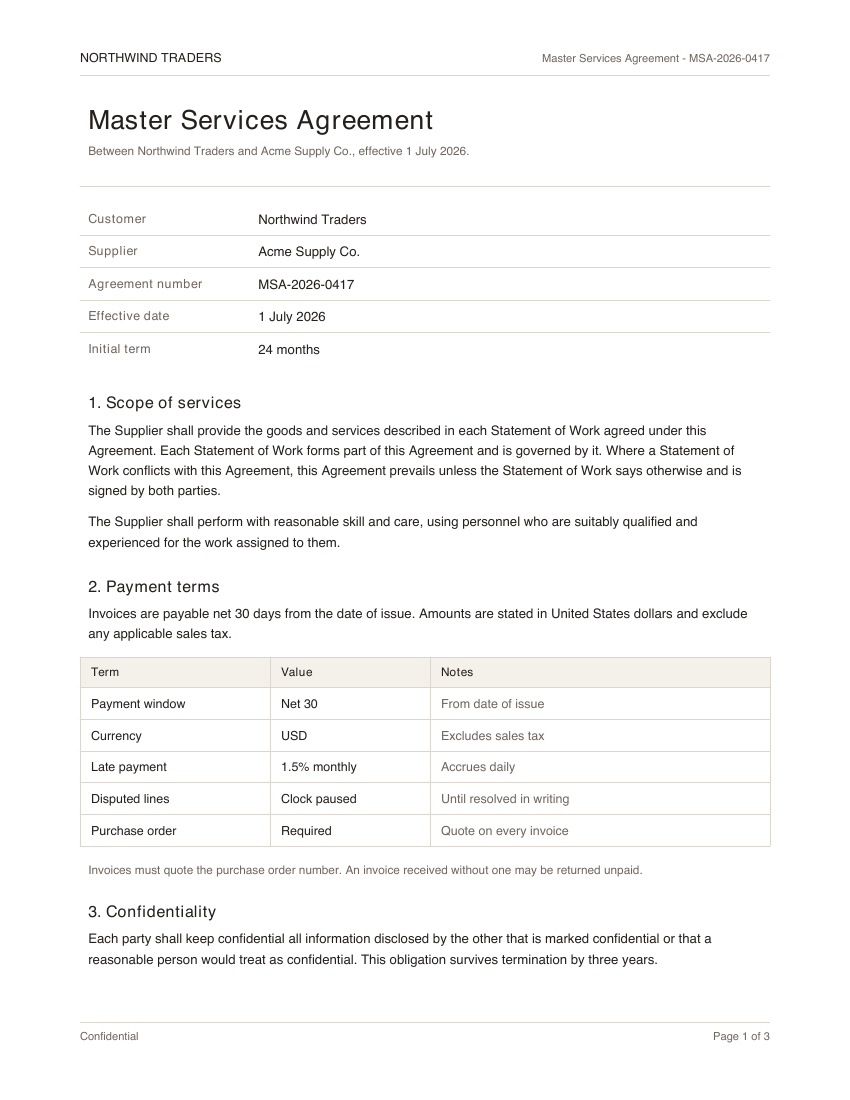
- Redaction 1: Customer name
- Redaction 2: Agreement number
2 redactions
- 1Customer name
- 2Agreement number
"use client"

import * as React from "react"

import {
  agreementRegion,
  customerRegion,
  pageImage,
} from "@/components/demos/document-fixtures"
import {
  Redaction,
  type RedactionRegion,
} from "mischief-ui/redaction"

export function RedactionDemo() {
  const [regions, setRegions] = React.useState<RedactionRegion[]>([
    { id: "customer", ...customerRegion, reason: "Customer name" },
    {
      id: "agreement-no",
      ...agreementRegion,
      reason: "Agreement number",
    },
  ])

  return (
    <Redaction
      className="w-full max-w-sm"
      alt="Master Services Agreement, page 1"
      regions={regions}
      src={pageImage}
      onCreate={(rect) =>
        setRegions((current) => [
          ...current,
          { id: `region-${current.length + 1}`, ...rect },
        ])
      }
      onDelete={(id) =>
        setRegions((current) => current.filter((region) => region.id !== id))
      }
    />
  )
}
Installation
Copy the source into your project, or keep it behind a package.
npx shadcn@latest add Tinkerers-Labs/mischief-ui/redactionimport { Redaction } from "mischief-ui/redaction"Or paste it in yourself. The source imports the shared cn helper from @/lib/utils, so point that at your own copy.
"use client" import * as React from "react"import { Eye, EyeOff, Trash2, TriangleAlert } from "lucide-react"import { cn } from "@/lib/utils" export type RedactionRegion = { id: string x: number y: number width: number height: number reason?: string}Usage
export function Prepare({ page }: { page: string }) {
  return (
    <Redaction
      src={page}
      alt="Statement, page 1"
      regions={regions}
      onCreate={(rect) => addRegion(rect)}
      onDelete={removeRegion}
    />
  )
}
This hides, it does not remove
The black boxes are drawn over an image in the browser. Nothing about the file underneath changes. If you serve the original alongside the regions, everyone still has the unredacted document, and a reader who opens it directly, saves the image, or asks the network tab will see exactly what you meant to hide.
Treat this component as the place where a person decides what to hide, and treat the regions it produces as instructions for a server that then does the hiding for real: rasterising the page with the pixels removed, or stripping the text from the source before the file is ever sent.
- Never send the original to a client that is only allowed to see the redacted version.
- Burn the redaction into the pixels on the server, then delete the original from anything the client can reach.
- For a PDF, removing the drawn rectangle is not enough -- the text layer beneath it has to go too, or the words remain selectable.
The reveal control exists for the person doing the redacting, so they can check their own work. It is not a permission boundary, and anything it can show was already in the page.
Regions
Regions are fractions of the image, from 0 to 1, and are clamped into that range rather than rejected. That keeps them correct as the image is resized, and it means the same numbers can be handed to a server that renders the page at a completely different scale.
function onCreate(rect) {
  setRegions((current) => [
    ...current,
    { id: crypto.randomUUID(), reason: "Bank details", ...rect },
  ])
}minSize rejects an accidental click that would otherwise leave an invisible region behind. Give a reason where you can: it is what makes an audit of what was hidden, and why, possible later.
API
src, altstringThe page image and its description.regionsRedactionRegion[]Id, optional reason, and x, y, width, height as fractions of the page.onCreate(rect: RedactionRect) => voidRuns with a new region. Omit it to disable drawing.onDelete(id: string) => voidRemoves a region.revealed, defaultRevealed, onRevealedChangebooleanWhether the covered regions are shown for review.readOnlybooleanShows the result without editing controls.RedactionRegion
idstringUnique within the set. Used to delete.x, ynumberTop-left corner as a fraction of the image, from 0 to 1.width, heightnumberSize as a fraction of the image, from 0 to 1.reasonstringWhy this was hidden. Worth recording for an audit.Accessibility
Every region carries a number and its reason in text, and says when it is revealed, so the state is never conveyed by a black rectangle alone. Revealing raises a status message stating that the cover is visual only and the source file still has to be redacted, because a component that merely paints over a page must not be mistaken for one that removes data.