27 / Documents
Annotation Layer
Notes attached to regions of a page. Drag to add one, select to read it, and the coordinates stay relative to the page rather than the screen.
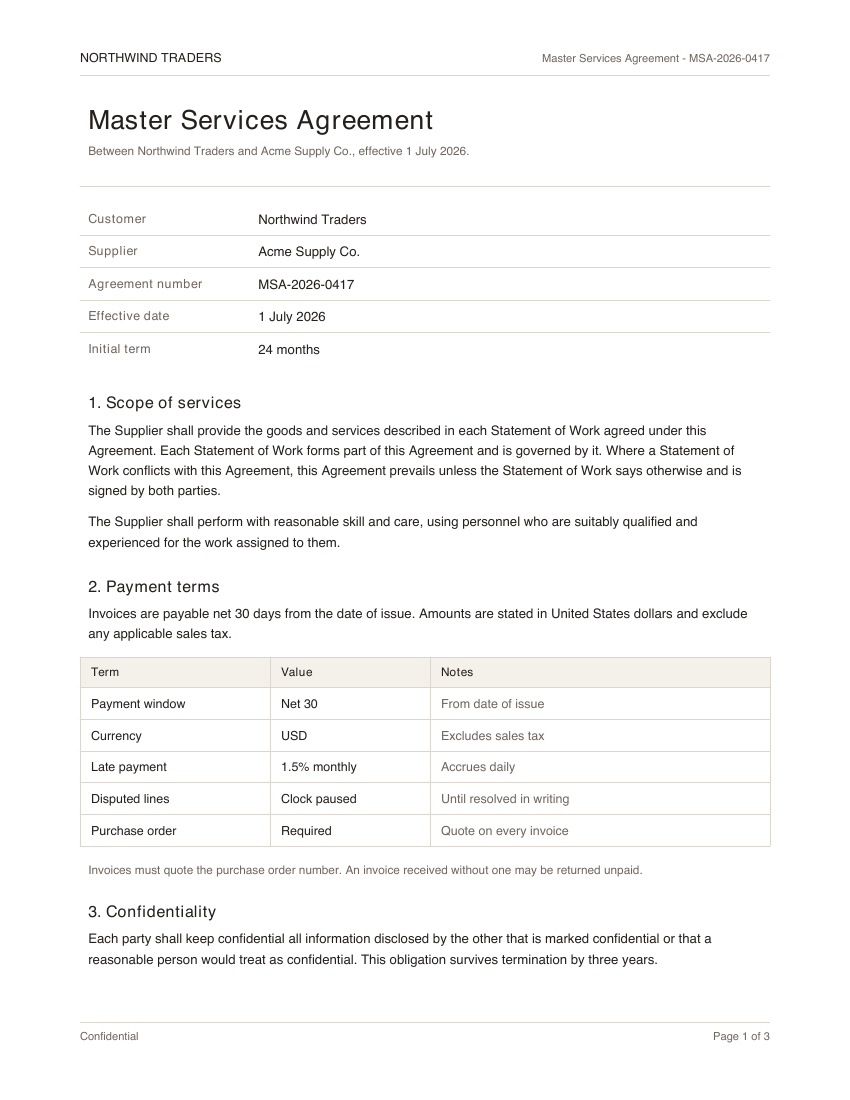
Drag on the page to add a note.
"use client"

import * as React from "react"

import { pageImage, paymentRegion } from "@/components/demos/document-fixtures"
import {
  AnnotationLayer,
  type Annotation,
} from "mischief-ui/annotation-layer"

export function AnnotationLayerDemo() {
  const [notes, setNotes] = React.useState<Annotation[]>([
    {
      id: "net30",
      ...paymentRegion,
      note: "Finance asked whether this should be net 45.",
      author: "Priya",
    },
  ])

  return (
    <AnnotationLayer
      className="w-full max-w-sm"
      alt="Master Services Agreement, page 1"
      annotations={notes}
      src={pageImage}
      onCreate={(rect) =>
        setNotes((current) => [
          ...current,
          { id: `note-${current.length + 1}`, ...rect, note: "New note" },
        ])
      }
      onDelete={(id) =>
        setNotes((current) => current.filter((note) => note.id !== id))
      }
    />
  )
}
Installation
Copy the source into your project, or keep it behind a package.
npx shadcn@latest add Tinkerers-Labs/mischief-ui/annotation-layerimport { AnnotationLayer } from "mischief-ui/annotation-layer"Or paste it in yourself. The source imports the shared cn helper from @/lib/utils, so point that at your own copy.
"use client" import * as React from "react"import { MessageSquare, Trash2 } from "lucide-react"import { cn } from "@/lib/utils" export type Annotation = { id: string x: number y: number width: number height: number note?: string author?: stringUsage
export function Review({ page }: { page: string }) {
  return (
    <AnnotationLayer
      src={page}
      alt="Contract, page 2"
      annotations={notes}
      onCreate={(rect) => addNote(rect)}
    />
  )
}
Coordinate system
Annotations are stored as fractions of the image rather than pixels: x and y are the top-left corner, width and height run from there, and everything sits between 0 and 1. A note therefore stays on the same words when the image is resized, zoomed, or rendered on a denser screen, and the same numbers survive being stored and read back at another size.
// A note over the middle of the page, whatever it renders at.
const annotation = {
  id: "clause-4",
  x: 0.25,
  y: 0.4,
  width: 0.5,
  height: 0.08,
  note: "Check this against the master agreement",
  author: "Aman",
}
Drawing and storing
The component holds no list of its own. Dragging on the image calls onCreate with the rectangle, and it is yours to store, give an id, and pass back in. Nothing appears until you do, which is what lets you await a save and show a failure instead of a note that was never kept.
async function onCreate(rect) {
  const saved = await api.annotate({ ...rect, note: await ask() })
  setAnnotations((current) => [...current, saved])
}
readOnly keeps the notes visible and stops new ones being drawn, which is the right mode for anyone without permission to comment. minSize discards a stray click that would leave an annotation too small to find again.
API
src, altstringThe page image and its description.annotationsAnnotation[]Id, note, author, and x, y, width, height as fractions of the page.onCreate(rect: AnnotationRect) => voidRuns with a new region when someone drags one out. Omit it to disable drawing.onDelete(id: string) => voidShows a delete control when given.activeId, defaultActiveId, onActiveChangestring | nullThe selected note, controlled or uncontrolled.minSizenumberSmallest drag that counts as a region. Defaults to 0.01 of the page.Annotation
idstringUnique within the set. Drives selection.x, ynumberTop-left corner as a fraction of the image, from 0 to 1.width, heightnumberSize as a fraction of the image, from 0 to 1.notestringThe comment itself.authorstringWho left it.Accessibility
Regions are toggle buttons carrying their note as an accessible name, so notes can be reached and read without a pointer. The note itself appears in a polite live region rather than a hover card. A drag that never moved is treated as a deselect instead of creating an unusably small region. Coordinates are fractions of the page, so they survive zoom and a change of screen.